Assessment Builder
Design assessments around the work that matters.
SkillCort Assessment Builder turns a role blueprint into a clear skill map, assessment structure, and task-to-rubric plan before the first candidate enters the flow.
Define what matters, how it will be measured, and how it will be scored.
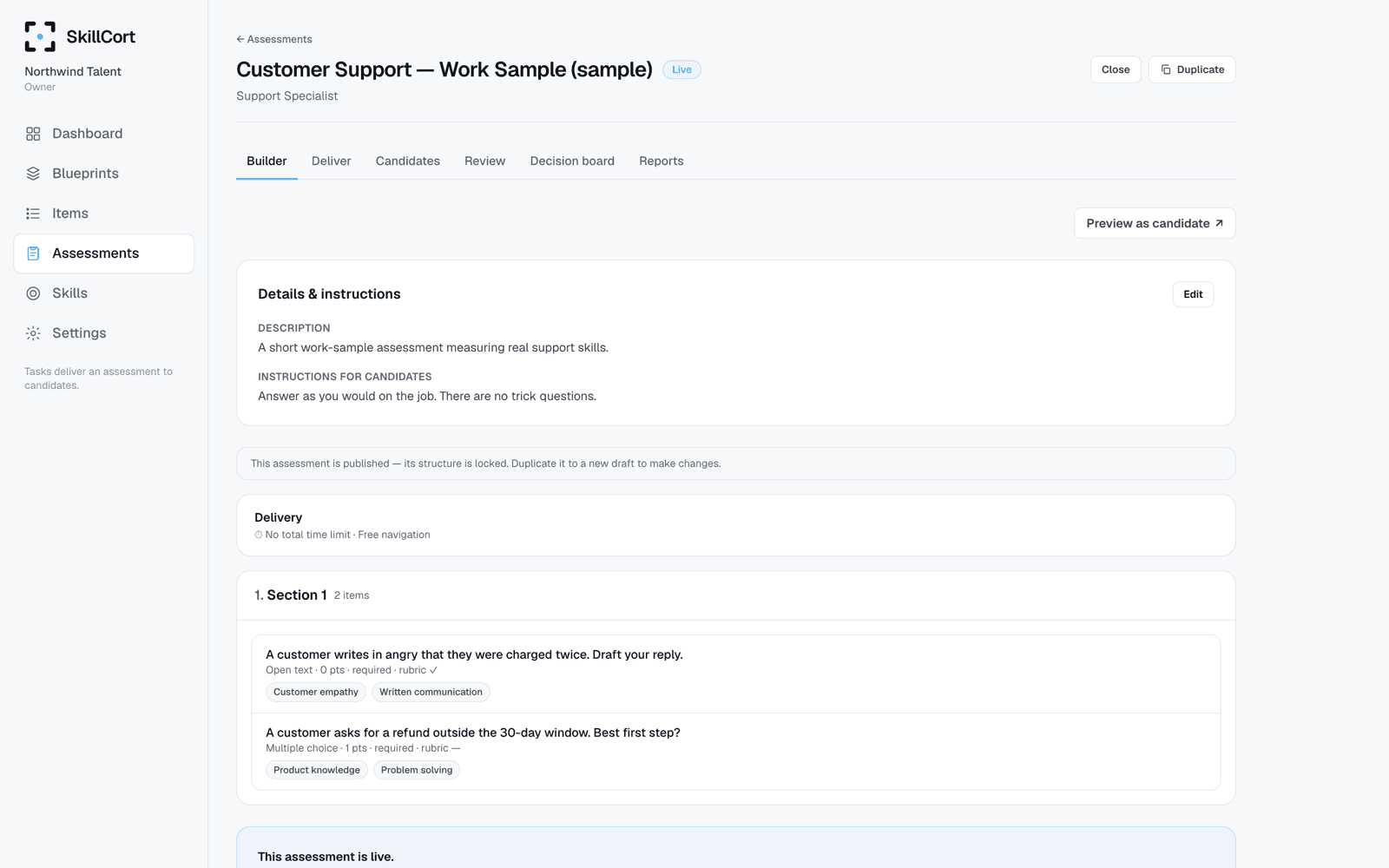
Design the logic before delivery begins
View the full platformStart with the role, not the test.
Translate the role and its expected outcomes into an assessment brief before choosing tasks or questions.
- Role and assessment objective
- Required skills and outcomes
- Evaluation priorities
- Reusable role structure
Make every measured skill intentional.
Organize the skills and sub-skills the assessment should measure, then set their relative importance for the role.
- Skill and sub-skill structure
- Role-specific weighting
- Coverage visibility
- Clear evaluation scope
Give every assessment a clear shape.
Arrange sections, tasks, instructions, and timing into a coherent assessment plan that matches the evaluation objective.
- Section and task ordering
- Format and response settings
- Instructions and time controls
- Candidate-flow preview
Decide how each task will be judged.
Connect tasks to the skills they test and define the criteria, scales, and weights evaluators will use later.
- Task-to-skill mapping
- Criteria-based scoring
- Rating scales and weights
- Evaluator instructions
Spot gaps before candidates see them.
Review whether the assessment gives each priority skill enough opportunity to be demonstrated and scored.
- Skill coverage overview
- Task and rubric traceability
- Weighting review
- Design gap checks
Review the full design before it goes live.
Check the assessment structure, scoring logic, instructions, and delivery handoff from one final design view.
- Assessment preview
- Scoring logic review
- Instruction check
- Controlled publishing state
Create assessment flows for different evaluation needs.
Hiring Assessments
Design role-specific assessments with a shared skill map and scoring definition.
Work Sample Assessments
Plan realistic tasks around the work candidates would actually perform.
Assessment Center Exercises
Structure case studies, role plays, and evaluator-led exercises around shared criteria.
Education Assessments
Build structured exams, assignments, and rubric-based evaluations.
Certification Assessments
Define the skills, standards, tasks, and scoring rules behind a certification decision.
Internal Mobility Assessments
Create role-based evaluation plans for development, promotion, or redeployment.
Built for the assessments teams run most.
Customer Support Hiring
Plan a role-relevant assessment for communication, empathy, prioritization, and problem solving.
Measured skills
- Written communication
- Empathy
- Resolution quality
- Prioritization
Example tasks
- Ticket response
- Difficult customer scenario
- Short written case
Expected output
- Role and skill blueprint
- Task-to-skill map
- Structured scoring rubric
Sales Hiring
Design around objection handling, written communication, discovery, and sales judgment.
Measured skills
- Objection handling
- Written communication
- Discovery
- Sales judgment
Example tasks
- Objection-handling scenario
- Prospecting email
- Short deal case
Expected output
- Skill coverage
- Task plan
- Scoring criteria
Assessment Centers
Give case studies, role plays, and evaluator-led exercises one shared evaluation structure.
Measured skills
- Analysis
- Communication
- Decision making
- Collaboration
Example tasks
- Case study
- Role play
- Group exercise
Expected output
- Exercise structure
- Shared evaluator rubric
- Assessment definition
From role blueprint to publish-ready design.
SkillCort helps teams define the evaluation logic before an assessment goes live — from the role and skill map to task structure, rubrics, and coverage.
The result is a shared assessment definition, not a disconnected list of questions.
Explore SkillCort OriginalsDefine the role
Set the role and its evaluation objective.
Map the skills
Select skills and sub-skills to measure.
Structure the assessment
Arrange sections, formats, and instructions.
Connect tasks and rubrics
Map each task to skills and scoring criteria.
Preview and publish
Review the complete design before delivery begins.
The design controls behind a structured assessment
Role Blueprint
Define the role, evaluation objective, and outcomes the assessment must cover.
Skill Mapping
Organize skills, sub-skills, and their relative importance for the role.
Assessment Structure
Arrange sections, task formats, instructions, and timing into one coherent plan.
See candidate deliveryTask & Rubric Mapping
Connect every task to measured skills, scoring criteria, scales, and weights.
Explore work samplesCoverage Review
See whether priority skills have enough task and rubric coverage before publishing.
Publishing Controls
Preview the full design and move it into delivery only when the structure is ready.
Reusable Design Patterns
Reuse proven role, skill, task, and rubric structures without losing role-specific control.
Explore SkillCort OriginalsAI-Assisted Drafting
Draft and refine assessment content with AI assistance while people retain publishing control.
See AI-assisted workflowsExample: Customer Support Hiring Assessment
Define role
Customer Support Specialist
Select skills
Written communication, empathy, problem solving, prioritization
Choose task formats
Customer ticket response, difficult customer scenario, short written case
Map tasks to skills
Each task covers a defined part of the role blueprint
Set rubric criteria
Tone, accuracy, resolution quality, clarity
Review and publish
Check coverage, instructions, and scoring logic before delivery.
More than a test builder.
Question-First Test Builder
- Starts with available questions
- Treats the total score as the main output
- Leaves role relevance implicit
- Separates tasks from scoring intent
- Makes coverage harder to inspect
SkillCort Assessment Builder
- Starts with the role
- Maps skills to tasks
- Connects tasks to scoring criteria
- Makes coverage visible before publishing
- Keeps design logic structured
- Hands a clear definition into delivery and review
SkillCort helps teams build assessments that are easier to defend, easier to review, and easier to turn into decisions.
Keep the design logic visible
A reviewer should be able to see why a task exists, which skill it measures, and how it will be scored. SkillCort keeps those design decisions connected before delivery begins.
- Human-controlled AI assistance
- Role-to-skill traceability
- Task-to-rubric mapping
- Visible scoring weights
- Candidate-flow preview
- Reusable design patterns
- Defined publishing state
Frequently asked questions
SkillCort Assessment Builder is the assessment-design workspace for turning a role into a structured skill map, assessment flow, task plan, and scoring rubric.
No. A question-first builder starts from items. SkillCort starts from the role and keeps skills, tasks, coverage, and scoring logic connected.
Yes. You can include realistic task formats such as case studies, written responses, video responses, simulations, and file-based assignments, then map them to skills and rubrics.
Yes. The design can include structured criteria, rating scales, weights, and evaluator instructions. Evaluators use that definition in the Evaluation & Evidence workflow.
No. AI can assist with drafting and review workflows, but people control what is published and make the final evaluation decision.
Yes. Teams can reuse role, skill, task, and rubric structures while adapting each assessment to the role.
The published definition moves into Candidate Experience & Delivery. Candidate work and evaluator records then flow into Evaluation & Evidence and the Decision Board.
Start with a clearer assessment definition.
Use SkillCort Assessment Builder to align the role, skills, tasks, and scoring logic before candidate delivery begins.