Candidate Experience & Delivery
A clear assessment experience, from invite to submission.
Choose how candidates enter, explain exactly what the assessment collects, catch setup problems before the clock starts, and show candidates when each response has been saved.
Delivery rules apply per cohort, while extended time can be granted per candidate.
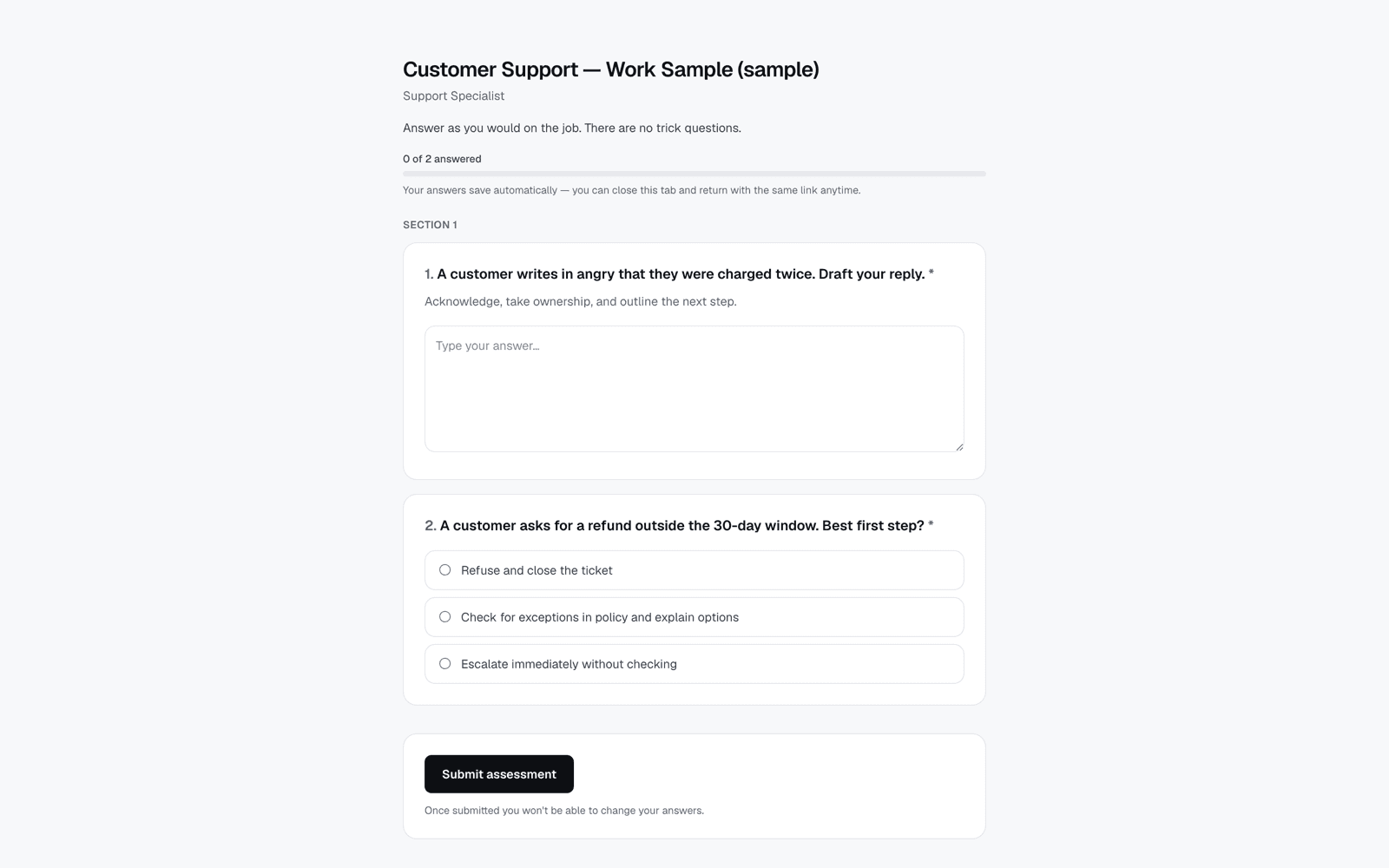
Give candidates clarity before, during, and after every task
Use the access method that fits the cohort.
Invite candidates by email or configure self-registration, single-use invitation codes, or credential matching against a guest list. Availability windows are enforced on the server.
- Email invitations
- Public self-registration when enabled
- Invitation codes and guest-list credentials
- Server-enforced availability window
Explain the setup before the timer begins.
The consent gate reflects the controls configured for that delivery. Where camera, screen, microphone, or identity material is required, preflight surfaces permissions and setup issues before the attempt starts.
- Monitoring disclosed before entry
- Setup checks matched to enabled controls
- Permission problems surfaced early
- No silent capture
Keep progress and time easy to understand.
A persistent assessment bar, question navigator, page controls, timers, mark-for-review flags, and save status help candidates stay oriented while they work.
- Visible saving and saved status
- Assessment and page timers
- Question navigation and progress
- Mark for review
Show what remains before submission.
Before committing, candidates see answered, unanswered, and marked-for-review counts. In free-navigation assessments they can return directly to unfinished questions.
- Pre-submit response summary
- Unanswered-question links
- Marked-item count
- Deliberate final submission
Configure the delivery without redesigning the assessment.
Cohort-specific delivery
Run the same assessment for another cohort with its own schedule, access path, and security configuration.
Per-candidate extended time
Staff can apply an extended-time multiplier to one invitation, and the runner applies it across the candidate's timers.
Typed voice-task fallback
Turn-based voice interview tasks always offer a typed response path when speaking or microphone access is not workable.
Candidate preview
Preview the published flow from the candidate side before sending invitations to a real cohort.
Stable shuffled order
When shuffling is enabled, each attempt keeps its assigned order after a refresh while other candidates can receive a different order.
Rubric transparency
Show candidates the criteria and, optionally, their weights during the assessment without exposing evaluator scores.
Separate assessment design from delivery rules.
Build the tasks once, then configure how each cohort reaches them. A delivery carries its own window, access method, identity settings, and proportional integrity controls.
That separation lets you reuse a stable assessment while adapting the logistics to a campaign, classroom, certification window, or individual accommodation.
See assessment designConfigure the delivery
Set the window, access route, and controls for the cohort.
Preview the journey
Check the consent gate, setup, content, navigation, and timers.
Invite candidates
Send email invitations or open another configured access method.
Support exceptions
Apply staff-granted extended time to the individual invitation when needed.
The details that make an assessment easier to complete
Clear entry rules
Candidates know when and how they can enter, with access decisions enforced server-side.
Disclosed capture
The consent gate states which enabled controls collect camera, screen, microphone, or identity material.
Visible progress
Navigation, timers, review markers, and completion counts keep the candidate oriented.
Safer continuity
Saved responses and a stable attempt order support candidates who return after a refresh or interruption.
A delivery experience built around clarity
A fragmented assessment journey
- A link with no clear access window
- Permissions requested after the clock starts
- Manual saving and uncertain progress
- No clear route back to unfinished work
- One rigid setup for every candidate
Candidate experience in SkillCort
- Access and timing configured per delivery
- Consent and setup completed before entry
- Save status visible while candidates work
- Progress, timers, and marked items kept visible
- Staff-granted extended time applied per candidate
Candidates can focus on the work when the interface answers the practical questions before they become distractions.
Proportional controls, explained up front.
Delivery settings determine what is collected. SkillCort reflects those settings in the candidate consent and preflight gate so a lightweight work sample does not have to feel like a high-stakes proctored exam.
- Controls configured per delivery
- Capture disclosed before the attempt
- Hardware checked only when needed
- Integrity events kept separate from scores
- Typed fallback for turn-based voice tasks
- No automatic rejection from a signal
Candidate experience questions
Email invitations are the default. A delivery can also be configured for public self-registration, single-use invitation codes, or credential matching against a guest list. The assessment must be published before invitations can be sent.
Responses already marked as saved remain on the attempt, and its assigned question order stays stable after a refresh. A save error is shown so the candidate can retry; server-side assessment and page deadlines continue to apply.
Yes. The consent gate states which controls are enabled for that delivery before the candidate enters. Preflight checks the relevant setup when camera, screen, microphone, or identity material is required.
Yes. An authorized staff member can apply a per-candidate time multiplier to the invitation, and the candidate runner applies it to the relevant timers. Candidate-initiated accommodation requests are not currently a self-service workflow.
Turn-based voice interview tasks include a typing fallback, so a missing or blocked microphone does not prevent completion. Questions are also shown with subtitles.
Walk through the assessment as a candidate.
Bring one assessment to a demo and see its access, preflight, runner, review, and submission journey end to end.